
Cold Start Performance: The Hidden Latency Problem
Understanding cold starts — why first requests are slow, where they happen, and how to measure and minimize their impact.
The first request is always the slowest. Your API has been sitting idle, caches are empty, connections are closed, maybe the whole process isn't even running. Then a request arrives and everything needs to wake up.
This is the cold start problem. And it's more common than you might think.
Where cold starts happen
Serverless functions are the obvious case. AWS Lambda, Google Cloud Functions, Azure Functions — they spin up containers on demand. The first request after idle time pays the startup cost. Sometimes that's 100ms. Sometimes it's several seconds.
But cold starts aren't just a serverless thing. Traditional servers have them too.
Application restart? Cold start. New container deployment? Cold start. Auto-scaled instance joining the pool? Cold start. JIT compilation on first execution? Cold start. Database connection establishment? Cold start. Empty cache after restart? Effectively a cold start.
Any time your system transitions from idle to active, there's overhead.
Why it matters
Cold starts affect real users. The person who happens to hit your API right after deployment gets a slow response. The early morning user who wakes up your serverless function waits longer than everyone else.
And cold starts affect your metrics. If you're measuring percentiles, cold starts inflate your p99 and p99.9. A few slow cold-start requests can make your latency distribution look worse than steady-state performance actually is.
For some applications, cold starts are acceptable. For others, they're a serious problem. Real-time applications, user-facing APIs, anything latency-sensitive — cold starts hurt.
Measuring cold starts
Standard load tests often miss cold starts. You warm up the system, run sustained traffic, measure steady-state performance. The cold start happened at the beginning and got averaged away.
To measure cold starts specifically, you need a different approach.
Start from a truly cold state. Fresh deployment, no warm-up, caches cleared. Send a single request and measure the response time. That's your cold start latency.
Then compare to warm performance. After the system is running, what's the typical response time? The difference tells you the cold start penalty.
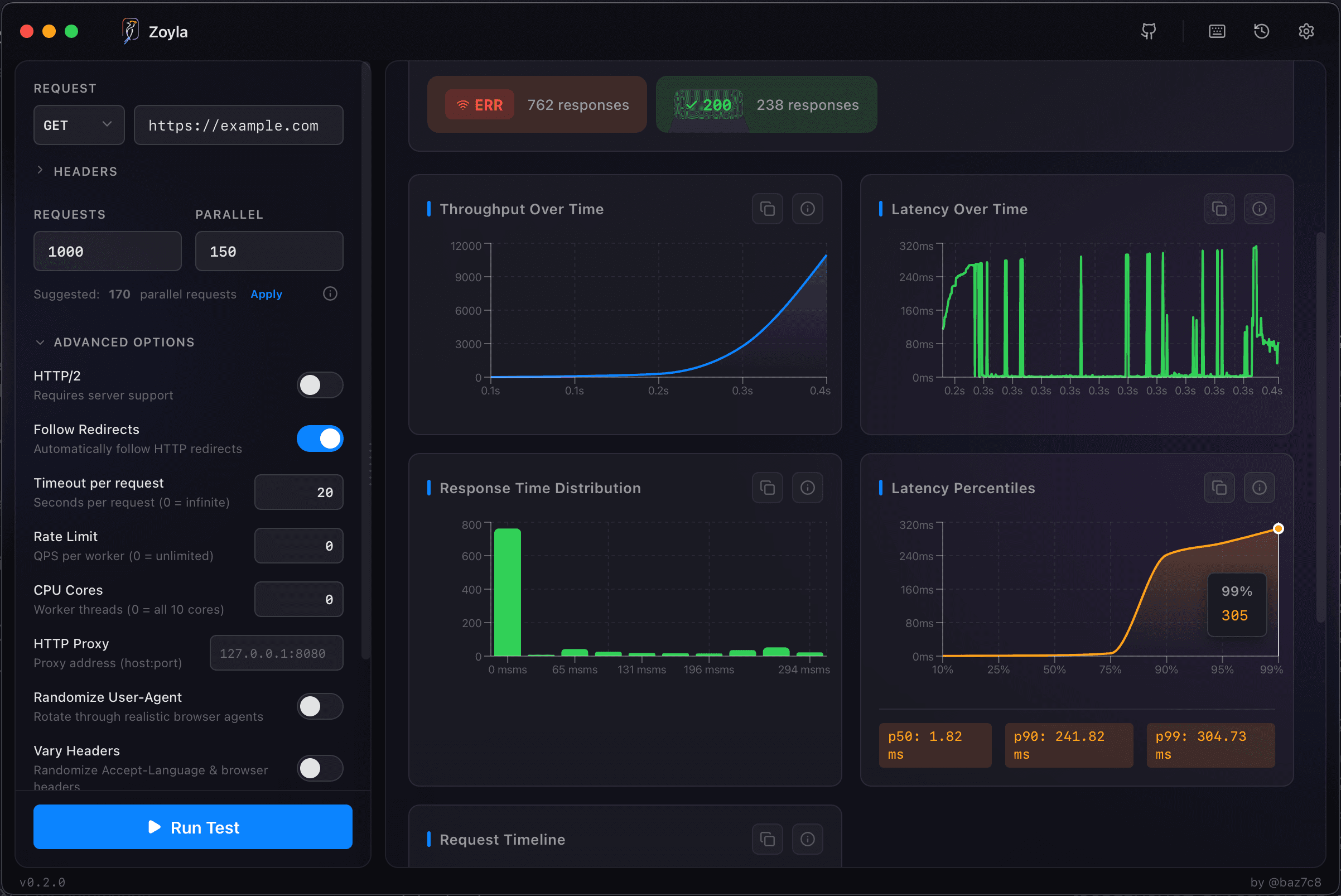
Zoyla shows you the full distribution. If your first few requests are dramatically slower than the rest, you're seeing cold start effects. The min/max spread and the gap between p50 and p99 reveal this pattern.
Sources of cold start latency
Container startup is the big one for serverless. The platform needs to provision a container, load your code, initialize the runtime. This can take hundreds of milliseconds to several seconds depending on the platform and your code size.
JIT compilation affects JVM languages and others with just-in-time compilers. The first time code paths execute, they're interpreted or compiled. Subsequent executions are faster.
Database connection establishment takes time. TCP handshake, authentication, protocol negotiation. Connection pooling amortizes this, but the first connection still pays the cost.
Cache misses mean the first requests hit the database or compute path instead of returning cached results. This isn't exactly a cold start but feels like one to users. The caching impact testing guide covers how to measure this.
Dependency initialization — loading configurations, establishing connections to external services, warming up internal caches — all adds to startup time.
Reducing cold start impact
For serverless, keep your functions small. Smaller deployment packages load faster. Fewer dependencies mean less initialization.
Use provisioned concurrency if your platform supports it. This keeps instances warm and ready, eliminating cold starts at the cost of always-on billing.
For traditional servers, pre-warm after deployment. Before routing production traffic to a new instance, send synthetic requests to trigger initialization.
Lazy initialization helps with some startup costs. Don't connect to the database until you need it. Don't load all configurations at startup. But be careful — this just moves the cold start from application startup to first use of each component.
Connection pooling with pre-established connections reduces per-request connection overhead. The pool initializes at startup, but individual requests don't pay the cost.
Cache warming can help if you know what data will be requested. Pre-populate caches during deployment rather than waiting for cache misses.
The baseline question
When you establish performance baselines, decide whether to include or exclude cold starts.
Including them gives you realistic worst-case numbers. Excluding them gives you achievable steady-state performance. Both are useful, but they answer different questions.
Document which you're measuring. "P99 latency of 200ms excluding cold starts" means something different than "P99 latency of 200ms including cold starts."
Testing cold start scenarios
To properly test cold starts, you need to trigger them intentionally.
For serverless, wait for the idle timeout before testing. Or deploy a fresh function and test immediately.
For traditional servers, restart the application and test before any warm-up traffic.
For caches, clear them and test the cache-miss path.
Run these tests separately from your steady-state load tests. Cold start performance and warm performance are different metrics that need different measurement approaches. The soak testing guide covers long-running tests that can reveal other time-based issues.
The caching impact testing guide covers cache-related cold start effects in more detail.
Accepting the tradeoff
Sometimes cold starts are acceptable. If your serverless function handles background jobs, a few hundred milliseconds of startup time doesn't matter. If your API is internal and not latency-sensitive, cold starts might be fine.
The question is whether cold starts affect your users' experience. If they do, invest in reducing them. If they don't, accept them and focus on other problems.
Know your cold start latency. Know how often it happens. Then decide if it's worth fixing. The monitoring during load tests guide covers what to watch for during these tests.
Want to measure your cold start performance? Download Zoyla and see the full latency distribution.