
P95, P99, and Why Averages Lie
Understanding latency percentiles — what p50, p95, and p99 mean, why they matter more than averages, and how to use them.
Average response time: 50ms. Looks great on a dashboard. But averages lie.
Here's why. You have 100 requests. 99 of them complete in 10ms. One takes 4 seconds. Your average? About 50ms. Sounds fine. But one in a hundred users waited 4 seconds. That's not fine.
Percentiles tell the truth that averages hide.
What percentiles mean
P50 is the median. Half your requests are faster than this, half are slower. It's a better "typical" than average because outliers don't skew it.
P95 means 95% of requests are faster than this number. Only 5% are slower. This is where you start seeing the slow tail.
P99 means 99% are faster. Only 1% are slower. This catches the really unlucky users.
P99.9 is the one-in-a-thousand case. Usually only matters at massive scale.
Why this matters
If you only look at averages, you miss the users having bad experiences. A system with 50ms average and 5 second p99 feels fast to most people but terrible to some.
Those "some" might be your most important users. The ones trying to complete a purchase. The ones on a slow connection who are already frustrated.
P95 and p99 show you the experience of your worst-served users. That's often where the real problems hide.
Reading the distribution
A healthy system has percentiles that are relatively close together. P50 of 20ms, p95 of 40ms, p99 of 80ms. The slow requests are only a few times slower than the fast ones.
A problematic system has a long tail. P50 of 20ms, p95 of 200ms, p99 of 2000ms. Something is causing occasional massive slowdowns. Maybe a database query that sometimes hits a slow path. Maybe garbage collection pauses. Maybe external service timeouts.
The gap between p50 and p99 tells you how consistent your performance is.
What to target
This depends on your application. But general guidelines:
For user-facing APIs, p95 under 200ms and p99 under 500ms is reasonable. Users notice delays above 200ms.
For internal services, you might tolerate higher latencies. Or you might need lower ones if they're on the critical path.
For real-time applications, you need tight percentiles. A video call can't wait 500ms for data.
Using percentiles in testing
When you run load tests in Zoyla, the results include the full percentile distribution. P50, p95, p99, plus min and max.
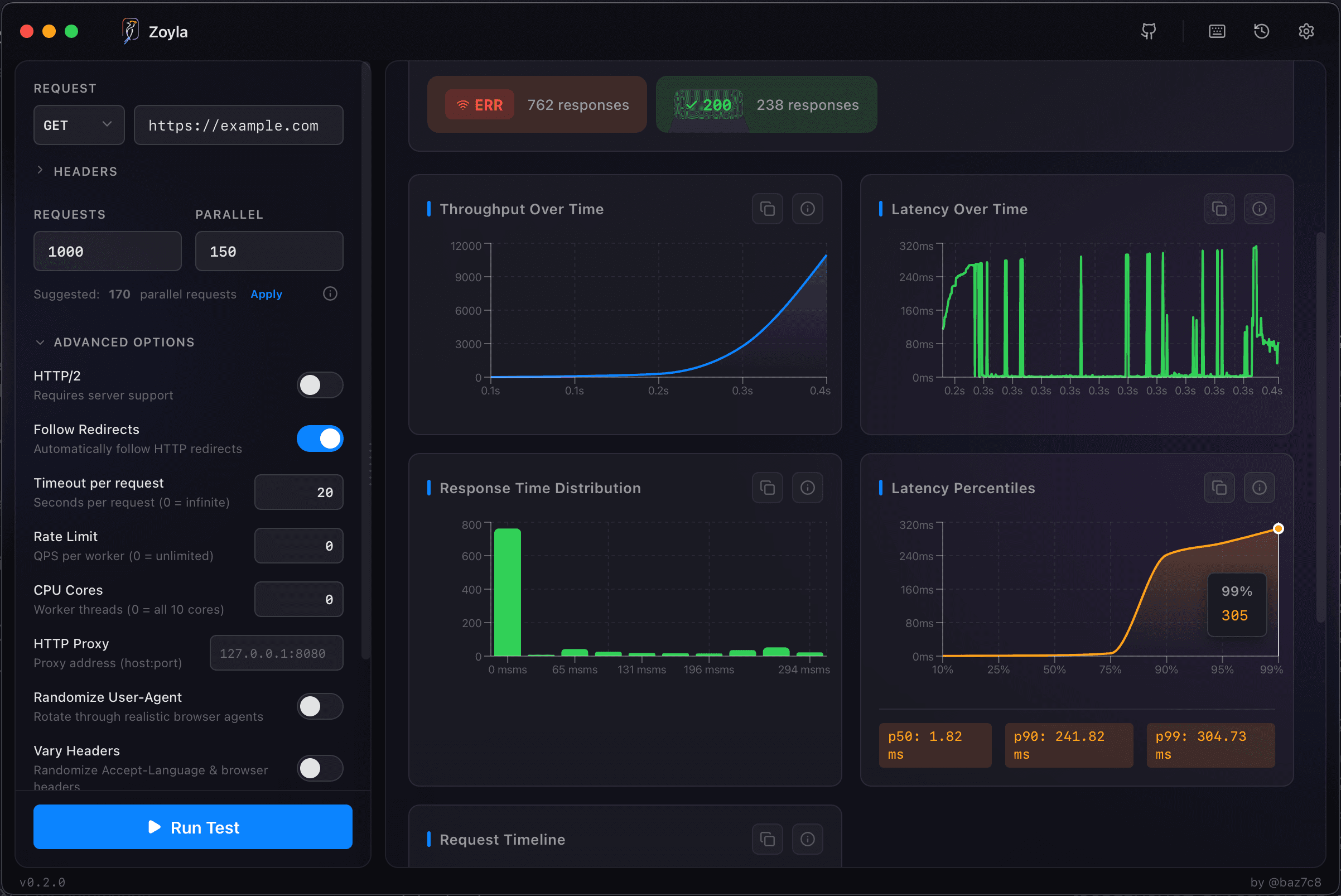
Look at how these change as you increase load. At low concurrency, percentiles are usually tight. As load increases, the tail gets longer. Finding where p99 starts spiking tells you where your practical capacity limit is.
For more on this relationship, see throughput vs latency.
Improving percentiles
If your p99 is bad but p50 is fine, you have an outlier problem. Something is occasionally slow.
Common causes: slow database queries that only trigger on certain data. External services with variable response times. Resource contention under load. Garbage collection pauses. Cold starts can also cause outliers.
Fixing p99 often requires finding and eliminating these edge cases. It's different from general optimization. The response time optimization guide covers strategies for improving these numbers.
The practical takeaway
Stop looking at averages. Or at least, stop only looking at averages.
When you run a load test, look at p95 and p99. When you set SLAs, set them on percentiles. When you debug performance, focus on what's making the tail long. The error rates under load guide covers what happens when things start failing.
Averages tell you about the common case. Percentiles tell you about the cases that matter most.
For the basics of what these metrics mean in context, check out understanding latency and throughput. And for a complete overview of all the metrics Zoyla provides, see the metrics that matter.