
When the Database Is the Problem
How to identify database bottlenecks in load testing and what to do when your database is limiting performance.
You run a load test. Response times are terrible. CPU on your app server is at 20%. Memory is fine. Network is fine. So what's slow?
Probably the database.
Databases are the bottleneck more often than anything else. They're doing the heavy lifting — storing data, querying it, maintaining consistency. And under load, that's usually where things fall apart first.
How to spot it
During your load test, watch database metrics alongside application metrics. The monitoring during load tests guide covers what to look for.
Connection count — if you're hitting the maximum connections, requests queue waiting for a connection. Latency spikes.
Query time — if individual queries are slow, everything that depends on them is slow.
CPU/IO on the database server — if the database machine is maxed out, adding more app servers won't help.
Lock contention — if queries are waiting on locks, you have concurrency issues.
If your app servers look healthy but response times are bad, the database is the prime suspect.
Common database bottlenecks
Missing indexes — queries scan entire tables instead of using indexes. Fine with 1000 rows. Disaster with 10 million.
N+1 queries — you fetch a list, then query for each item. 100 items means 101 queries. Under load, this multiplies.
Connection pool exhaustion — more requests than connections. Requests wait. Latency explodes.
Slow queries — that one query that takes 2 seconds. At 10 RPS, it's consuming 20 database-seconds per second. Not sustainable.
Write contention — lots of writes to the same rows. Locks pile up. Everything waits.
Finding the specific problem
Most databases have query logging. Enable it. Run your load test. Look at what's slow.
PostgreSQL has pg_stat_statements. MySQL has the slow query log. Use them.
You'll often find one or two queries responsible for most of the pain. Fix those first.
Fixing connection issues
If you're exhausting connections, you have options:
Increase the pool size. Simple but has limits — databases can only handle so many connections.
Use connection pooling middleware like PgBouncer. It multiplexes connections more efficiently.
Reduce connection hold time. If queries are fast, connections return to the pool quickly.
Fixing query issues
Add indexes for slow queries. This is often the biggest win. A query that takes 2 seconds without an index might take 2 milliseconds with one.
Rewrite N+1 patterns. Fetch related data in batches or joins instead of loops.
Cache frequently-read data. If you're querying the same thing repeatedly, maybe it shouldn't hit the database every time.
For more on caching, see measuring how much caching helps.
Scaling options
Read replicas — offload read queries to replicas. Works if your workload is read-heavy.
Sharding — split data across multiple databases. Complex but necessary at scale.
Caching layer — Redis or similar. Keep hot data in memory.
Query optimization — sometimes the answer is just better queries, not more hardware.
Testing after changes
Made a fix? Test again. Compare to your baseline.
If you added an index, you should see that specific query get faster. If you increased the connection pool, you should see fewer connection-wait timeouts.
Zoyla's test history helps here. Run the same test, compare results, see if your change actually helped.
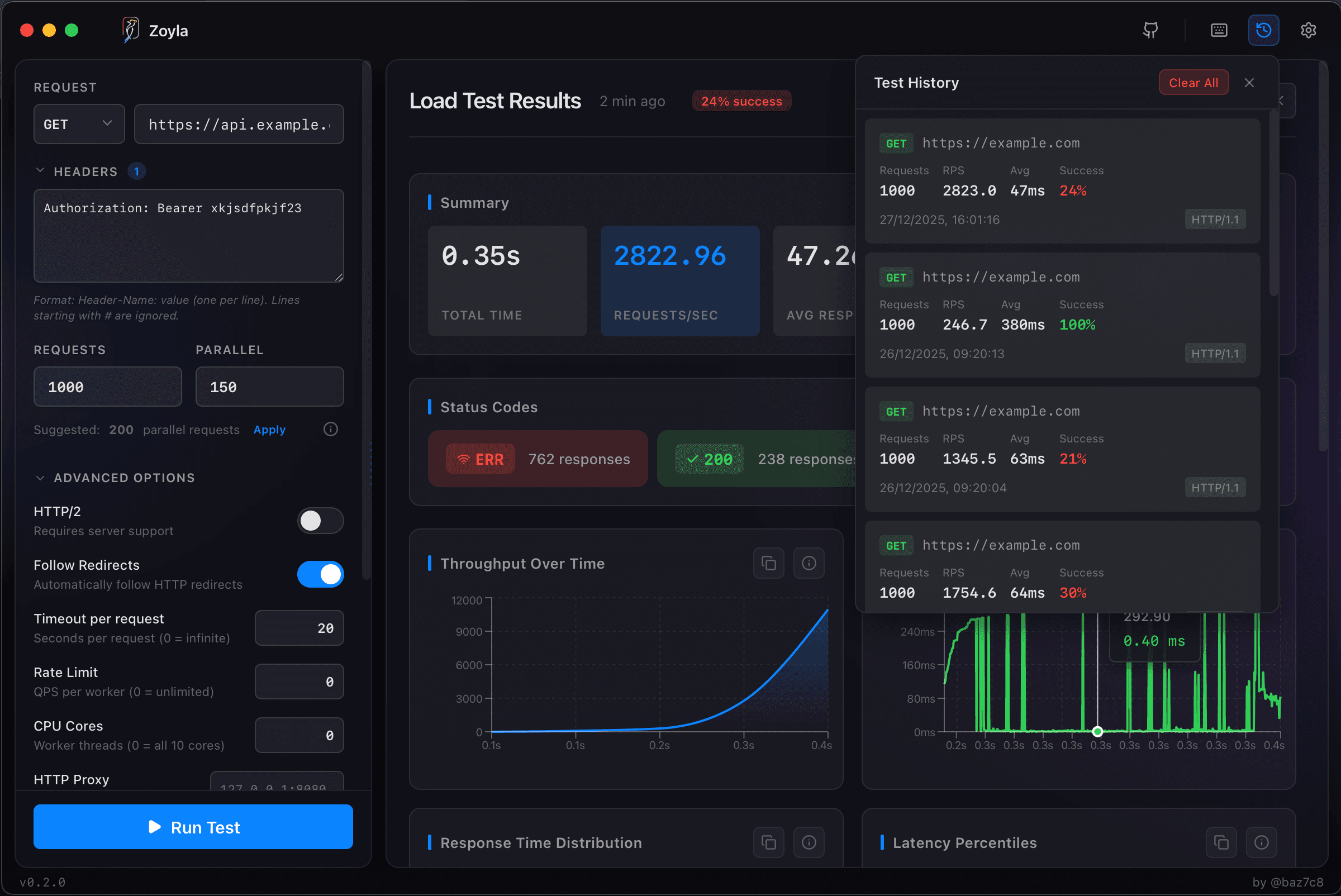
The iterative process
Database optimization is iterative. Find the worst bottleneck. Fix it. Test again. Find the new worst bottleneck. Repeat.
Each fix shifts the bottleneck somewhere else. Eventually you reach acceptable performance, or you've optimized everything you can and need to scale.
For the broader picture on interpreting results, check out how to read load test results.
The bottom line
When load tests show poor performance, check the database first. It's usually the culprit. And unlike application code, database issues often have straightforward fixes — add an index, increase the pool, cache the hot data.
Find the bottleneck. Fix it. Test again. That's the loop.