
Requests Per Second: The Number That Matters
Understanding requests per second (RPS) — what it measures, why it matters, and how to use it for capacity planning.
Requests per second. RPS. Throughput. Whatever you call it, this number tells you how much work your system can do. It's the capacity metric. The one that answers "how many users can we actually handle?"
What it measures
RPS counts how many HTTP requests your server processes in one second. Simple concept. But the implications run deep.
If your system handles 1000 RPS and each user makes one request per second, you can support 1000 concurrent users. If users make 10 requests per second each, you can support 100 users.
Real traffic is messier than that, of course. But RPS gives you a baseline for thinking about capacity.
Why it matters
RPS is your ceiling. Everything else flows from it.
Planning for a product launch? You need to know your RPS capacity and expected traffic. If capacity is lower than traffic, you have a problem to solve.
Comparing infrastructure options? RPS tells you which one handles more load.
Evaluating code changes? RPS shows whether your optimization actually improved throughput or just moved the bottleneck.
How to measure it
Run a load test. Configure enough concurrent connections to saturate your server. Look at the resulting RPS number.
The key is "enough concurrent connections." If you only send 10 concurrent requests and your server can handle 1000, you'll measure 10 RPS — but that's not your limit, that's your test's limit.
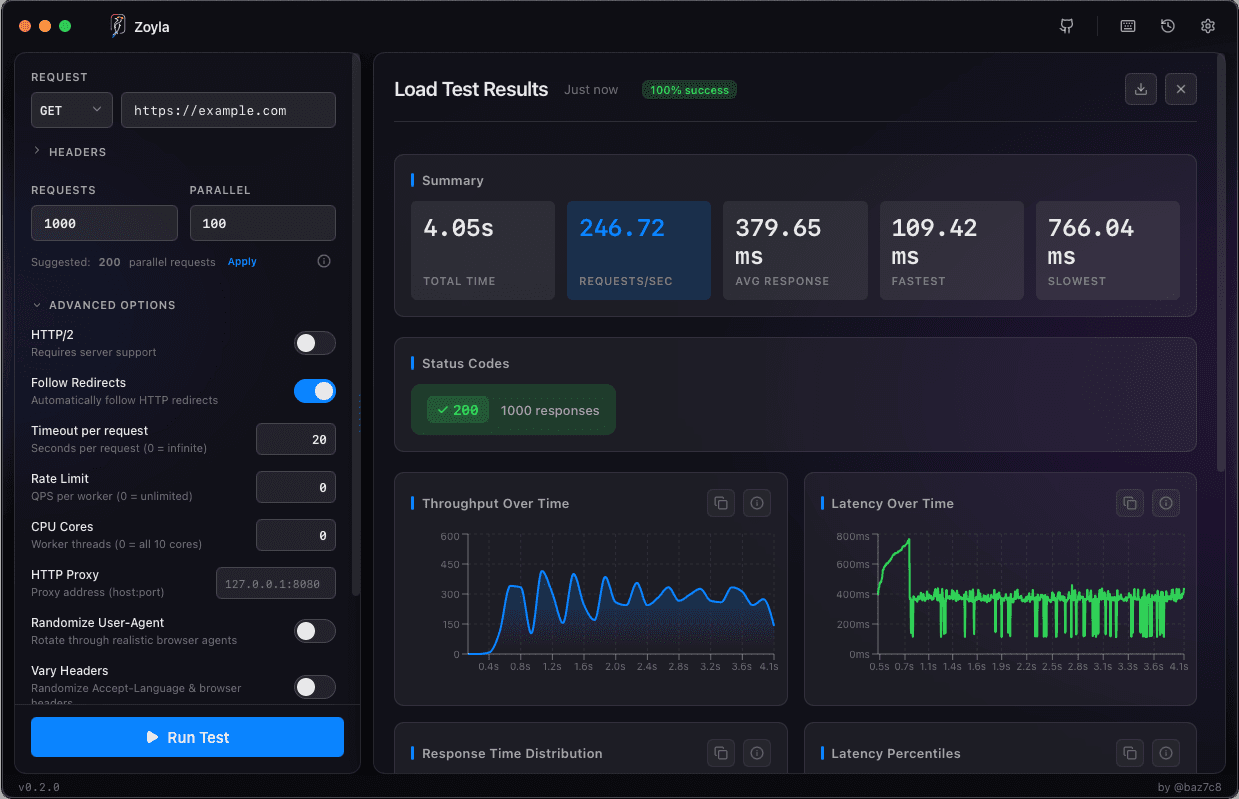
Zoyla shows RPS in the results dashboard after each test. You can see the throughput metrics clearly displayed, which helps you understand when you're hitting capacity.
RPS vs response time
These two metrics are connected. As you push RPS higher, response times typically increase. At some point, response times spike dramatically — that's your practical RPS limit.
The relationship isn't linear. You might handle 500 RPS with 50ms response times, 750 RPS with 100ms, and then 800 RPS with 2000ms. That cliff is where capacity runs out.
For more on this relationship, see throughput vs latency: the tradeoff.
What affects RPS
Everything in your stack contributes.
CPU-bound work limits how many requests you can process. Database queries limit how fast you can fetch data. External API calls limit how fast you can complete requests that depend on them. Connection limits cap how many simultaneous requests you can handle.
Finding which one is your bottleneck requires testing and monitoring. RPS tells you there's a limit. Other metrics tell you why.
Using RPS for planning
Say you're expecting 10,000 users at peak, each making 2 requests per second. That's 20,000 RPS you need to handle.
Your current setup handles 5,000 RPS. You need to 4x your capacity. Maybe that means more servers. Maybe that means optimizing slow endpoints. Maybe that means caching.
Without the RPS number, you're guessing. With it, you can plan. The capacity planning basics guide shows how to turn these numbers into infrastructure decisions.
Common mistakes
Measuring RPS with too few concurrent connections. You're measuring your test, not your server.
Measuring RPS against a cold cache. First requests are slow, subsequent ones are fast. Your steady-state RPS might be much higher than your cold-start RPS.
Ignoring error rates. If you're hitting 10,000 RPS but 20% are errors, your actual successful RPS is 8,000.
For more pitfalls, check out load testing mistakes that waste your time.
The bottom line
RPS is capacity. Know your number. Know what affects it. Use it to plan and validate.
It's not the only metric that matters — latency percentiles matter too — but it's the one that tells you how much your system can do.
For a complete overview of what Zoyla measures and how to read it, see the metrics that matter.