
Testing Webhook Endpoints Under Load
How to load test webhook receivers — the unique challenges of async endpoints and what metrics actually matter.
Webhooks flip the usual model. Instead of your code calling an API, an external service calls your API. Payment processors, GitHub, Stripe, Slack — they all push data to your endpoints when things happen.
Load testing webhooks is different because you don't control when traffic arrives. A viral moment, a batch process, a retry storm — suddenly you're receiving thousands of webhook calls and your endpoint needs to handle it.
Why webhook performance matters
When a webhook endpoint is slow, bad things happen. The sender might time out and retry, doubling your load. Or it might give up and you lose data. Some services mark your endpoint as unhealthy after too many failures and stop sending altogether.
Stripe, for example, expects responses within 20 seconds. Exceed that consistently and they'll disable your webhook. That's not a performance problem — that's a business problem.
And webhooks often arrive in bursts. A batch job completes and sends 10,000 events. A popular repository gets a flood of activity. Your endpoint needs to handle spikes, not just steady load.
Setting up the test
Webhook endpoints receive POST requests with specific payloads. To test them, you need to simulate those payloads accurately.
Look at the webhook documentation for your service. What headers do they send? What does the payload look like? Some services include signatures for verification — you'll need to handle that in your test setup.
Create realistic test payloads. If you're testing a payment webhook, use payloads that look like real payment events. The structure affects processing time.
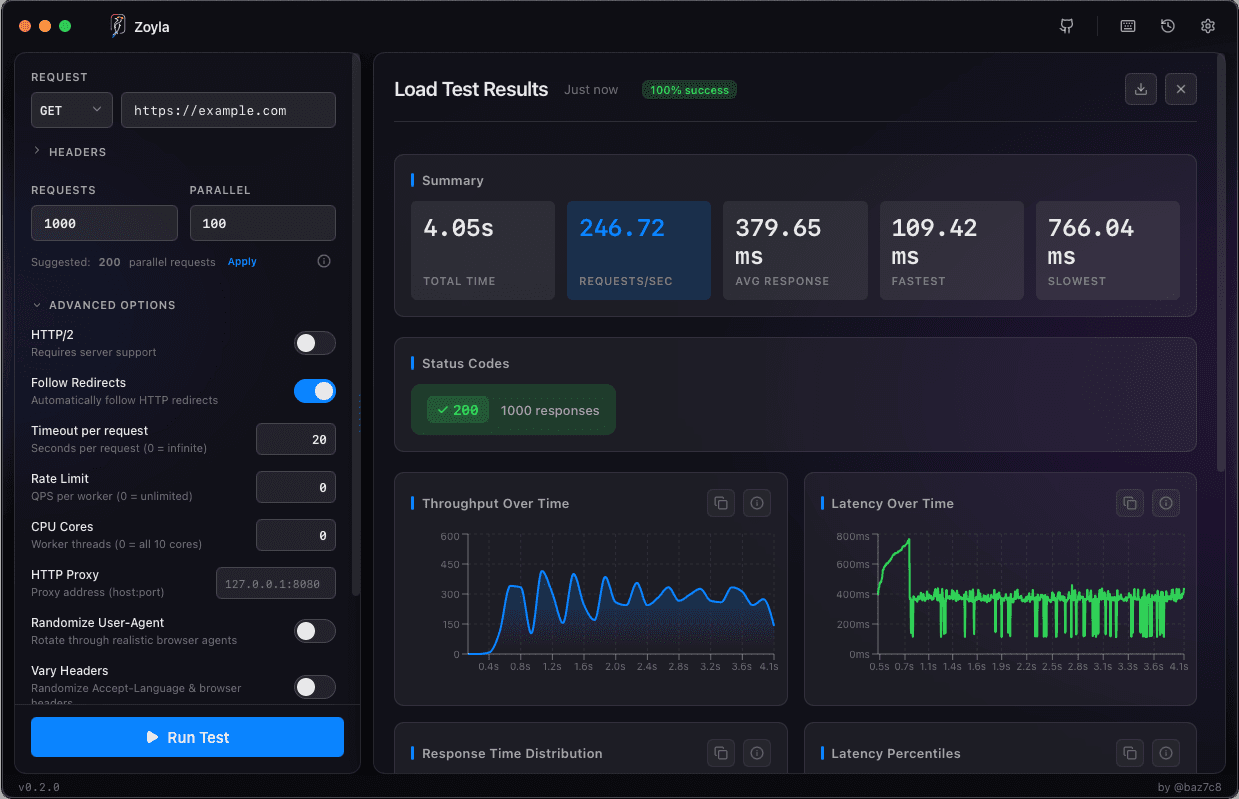
With Zoyla, you configure your webhook URL, set the appropriate headers and body, and run the test. The API load testing basics apply here — same fundamentals, different context.
The signature problem
Many webhook providers sign their payloads. Stripe uses HMAC-SHA256. GitHub uses HMAC-SHA1. Your endpoint verifies these signatures to ensure the webhook is legitimate.
For load testing, you have options. You can disable signature verification in your test environment — risky but simple. You can generate valid signatures for your test payloads — more work but more realistic. Or you can test a staging endpoint that skips verification.
The verification itself takes time. Cryptographic operations aren't free. Under load, signature verification can become measurable overhead. Testing with verification enabled tells you the real cost.
Response time expectations
Webhook endpoints should respond fast. Not because the sender cares about your response body — usually they don't — but because slow responses tie up their resources and trigger timeouts.
Aim for response times under 500ms. Under 200ms is better. If your processing takes longer, acknowledge the webhook immediately and process asynchronously.
This is a common pattern: receive webhook, validate signature, store raw payload, return 200, process later. The webhook is acknowledged in milliseconds. The actual work happens in a background job.
Async processing
If your webhook handler does significant work — updating databases, calling other services, sending notifications — consider async processing.
The webhook endpoint becomes trivial: validate, queue, respond. A separate worker processes the queue. This decouples receipt from processing and lets you handle bursts without timing out.
Load test both pieces. The webhook endpoint should handle high concurrency with fast response times. The worker should process the queue without falling behind. The timeout configuration testing guide covers setting appropriate timeouts for async processing.
Error handling under load
What happens when your webhook endpoint fails? The sender will retry. And retry. And retry.
This can create a feedback loop. Your endpoint is struggling, requests fail, the sender retries, load increases, more requests fail. Suddenly you're receiving 3x the traffic because everything is being retried.
Test your error scenarios. What happens at 10% error rate? 50%? Does your system recover when load decreases, or do retries keep it overwhelmed?
The error rates under load guide covers error patterns in detail.
Idempotency
Webhooks get delivered multiple times. Network issues, timeouts, sender retries — duplicate delivery is normal. Your endpoint needs to handle this gracefully.
Load testing can surface idempotency bugs. Send the same webhook multiple times. Does your system handle it correctly? Or do you get duplicate records, duplicate charges, duplicate notifications?
This isn't strictly a performance issue, but load testing is a good time to verify it. High load increases the chance of duplicates, and duplicates under load can cause cascading problems.
Realistic patterns
Real webhook traffic isn't uniform. Events cluster around activity. A deployment triggers a burst of CI webhooks. A sale triggers a burst of payment webhooks.
Test with realistic load patterns. Start with steady traffic, then spike to 10x. See how your endpoint handles the burst and how quickly it recovers.
Also test sustained load. Some webhook sources send continuously. Can your endpoint handle 100 requests per second for an hour? What about 1000?
Monitoring in production
Load testing tells you what your endpoint can handle. Monitoring tells you what it's actually experiencing.
Track webhook response times, error rates, and queue depth (if using async processing). Alert when these metrics exceed thresholds. A slow webhook endpoint might not cause immediate user-visible problems, but it's a sign of trouble. The testing third-party APIs guide covers the other side of webhook integrations.
And track retry rates. If you're seeing lots of retries from webhook senders, something is wrong even if your metrics look okay.
The bottom line
Webhook endpoints are critical integration points. They need to be fast, reliable, and resilient to bursts. Load test them like you'd test any critical endpoint — maybe more carefully, because failures affect external integrations, not just your own users.
Fast acknowledgment, async processing, proper error handling. Get these right and your webhooks will handle whatever traffic comes their way.
Ready to test your webhook endpoints? Download Zoyla and make sure they can handle the load.