
What is HTTP Load Testing?
Learn the fundamentals of HTTP load testing, why it matters for your applications, and how to get started with performance testing your APIs and web services.
So you've built something. An API, a web app, maybe both. It works great on your machine, handles your test requests like a champ. But here's the thing — your machine isn't production. And those ten requests you fired off during development? That's not what real traffic looks like.
HTTP load testing is how you figure out what happens when things get real. You simulate a bunch of users hitting your endpoints at the same time, and you watch what breaks. Or doesn't break. Hopefully doesn't break.
Why bother?
Look, you could skip this whole thing. Deploy to production, cross your fingers, hope for the best. Some people do that. It works until it doesn't.
The problem is that performance issues are sneaky. Your app might handle 50 concurrent users just fine. But at 500? Maybe that database query you wrote starts choking. Maybe your server runs out of memory. Maybe response times go from 100ms to 10 seconds and your users start rage-clicking, which makes everything worse.
Load testing tells you where the ceiling is before you hit your head on it. You learn how many users you can actually handle. You find the slow endpoints, the memory leaks, the queries that need indexes. And you get numbers — actual metrics you can point to when someone asks "can our system handle Black Friday traffic?"
What you're actually measuring
When you run a load test, you're collecting data. Lots of it. But a few metrics matter more than others.
Response time is the obvious one. How long does it take for your server to respond? But don't just look at the average — that number lies. If 99 requests take 50ms and one takes 5 seconds, your average looks fine at 99ms. Your user who waited 5 seconds disagrees. That's why you want percentiles. The p95 tells you what 95% of your users experience. The p99 catches those unlucky outliers. The guide on latency percentiles digs deeper into why this matters.
Throughput measures volume. How many requests per second can your system handle before it starts falling over? This is your capacity number. The one you need for planning.
And then there's the error rate. Some requests will fail under load. That's expected. But how many? At what point does your system go from "slightly stressed" to "actively on fire"? These are good things to know before your actual users find out.
Different tests for different questions
Not all load tests are the same. What you run depends on what you're trying to learn.
A smoke test is quick and light. You're just checking that things work at all under minimal load. Think of it as a sanity check. Takes a few minutes.
A proper load test simulates your expected traffic. If you normally get 1000 users during peak hours, you simulate 1000 users. Run it for 15 minutes, maybe an hour. See if anything degrades over time.
Stress testing is where you push past normal. You keep adding load until something breaks. The goal isn't to survive — it's to find the breaking point. Where does it fail? How does it fail? Does it recover? There's more on this in the stress testing vs load testing comparison.
And soak tests run for hours. Sometimes days. You're looking for slow leaks. Memory that doesn't get freed. Connections that don't close. The kind of bugs that only show up after your app has been running for a while.
Getting started
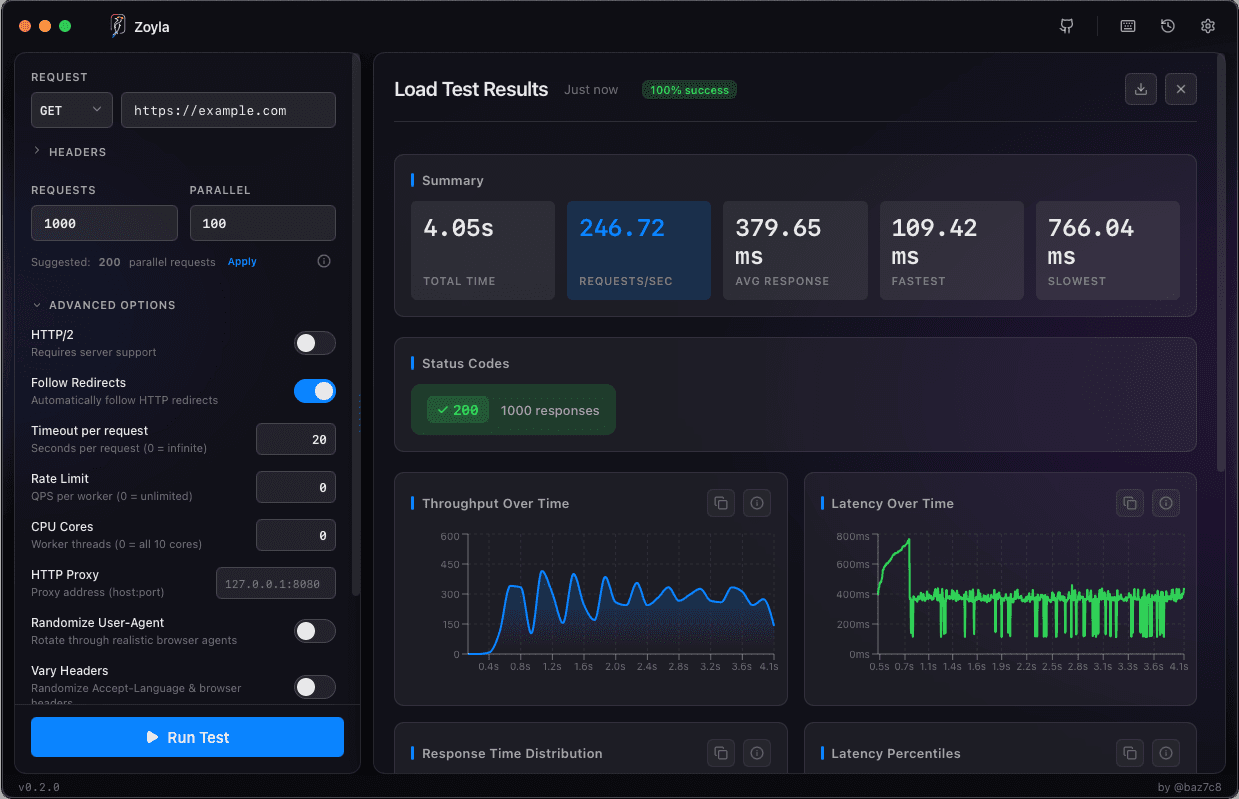
Zoyla makes this pretty straightforward. It's a desktop app, so you just open it up, punch in your endpoint URL, set your concurrency and request count, and hit run. No config files to write, no terminal commands to memorize. Point and click.
Say you want to send 1000 requests to your API with 50 happening at the same time. You set those numbers in the interface, pick your endpoint, and go. A few seconds later you're looking at response times, throughput, error rates — the works. All visualized, easy to read.
Start small. There's no point in immediately throwing 10,000 concurrent users at your staging server. You'll just crash it and learn nothing useful. Begin with numbers you know your system can handle, then gradually increase until you find the limits.
A few things to keep in mind
Test against an environment that looks like production. Same hardware, same network setup, same database size. Testing against a tiny dev database with 100 rows tells you nothing about how your app handles a million.
Monitor everything while the test runs. CPU usage, memory, database connections, disk I/O. The load test results tell you what happened. Your monitoring tells you why.
And please, don't load test production without telling anyone. I've seen that go badly. Use staging. Or at least warn people first.
One more thing — run your tests multiple times. A single run can have noise. Network hiccups, garbage collection pauses, whatever. Run it three times, look for patterns.
That's the basics. You now know enough to be dangerous. Go break something on purpose, before your users break it for you. If you're wondering about timing, check out when you should actually load test.
Ready to try it? Download Zoyla and run your first load test in under a minute.