
Why Your API Response Times Are Slow (And How to Fix Them)
Practical strategies for identifying and fixing slow API response times, from database queries to network overhead.
Your API is slow. You know it's slow because users are complaining, or because you ran a load test and the numbers made you wince. But knowing something is slow and knowing why it's slow are two different problems.
Response time is the sum of everything that happens between a request arriving and a response leaving. Any piece of that chain can be the bottleneck. The trick is figuring out which piece.
Where the time actually goes
When a request hits your API, a lot happens. The web server accepts the connection. Your application code runs. Databases get queried. Maybe external services get called. Then everything gets serialized and sent back.
Each step takes time. And under load, each step takes more time. The question is which step is eating most of it.
Start by measuring. You can't optimize what you can't see. Add timing to your code, check your logs, look at the percentile distribution of your response times. If p50 is 50ms but p99 is 2 seconds, you have an intermittent problem. If everything is uniformly slow, you have a systemic one.
The usual suspects
Database queries are the most common culprit. That query that runs fine with 1000 rows becomes a disaster with a million. Missing indexes, N+1 patterns, connection pool exhaustion — the database bottlenecks guide covers these in detail.
But it's not always the database. Sometimes it's external API calls. You're waiting on a third-party service that's having a bad day. Or you're making calls sequentially when they could be parallel.
Sometimes it's your own code. Inefficient algorithms, unnecessary computation, serialization overhead. A function that runs in microseconds gets called a thousand times and suddenly you've lost a second.
And sometimes it's infrastructure. Not enough CPU, not enough memory, network latency between services. The code is fine but the environment isn't.
Finding the bottleneck
Run a load test. Watch what happens. Zoyla shows you response times, throughput, and error rates in real time. But you also need to watch your infrastructure while the test runs.
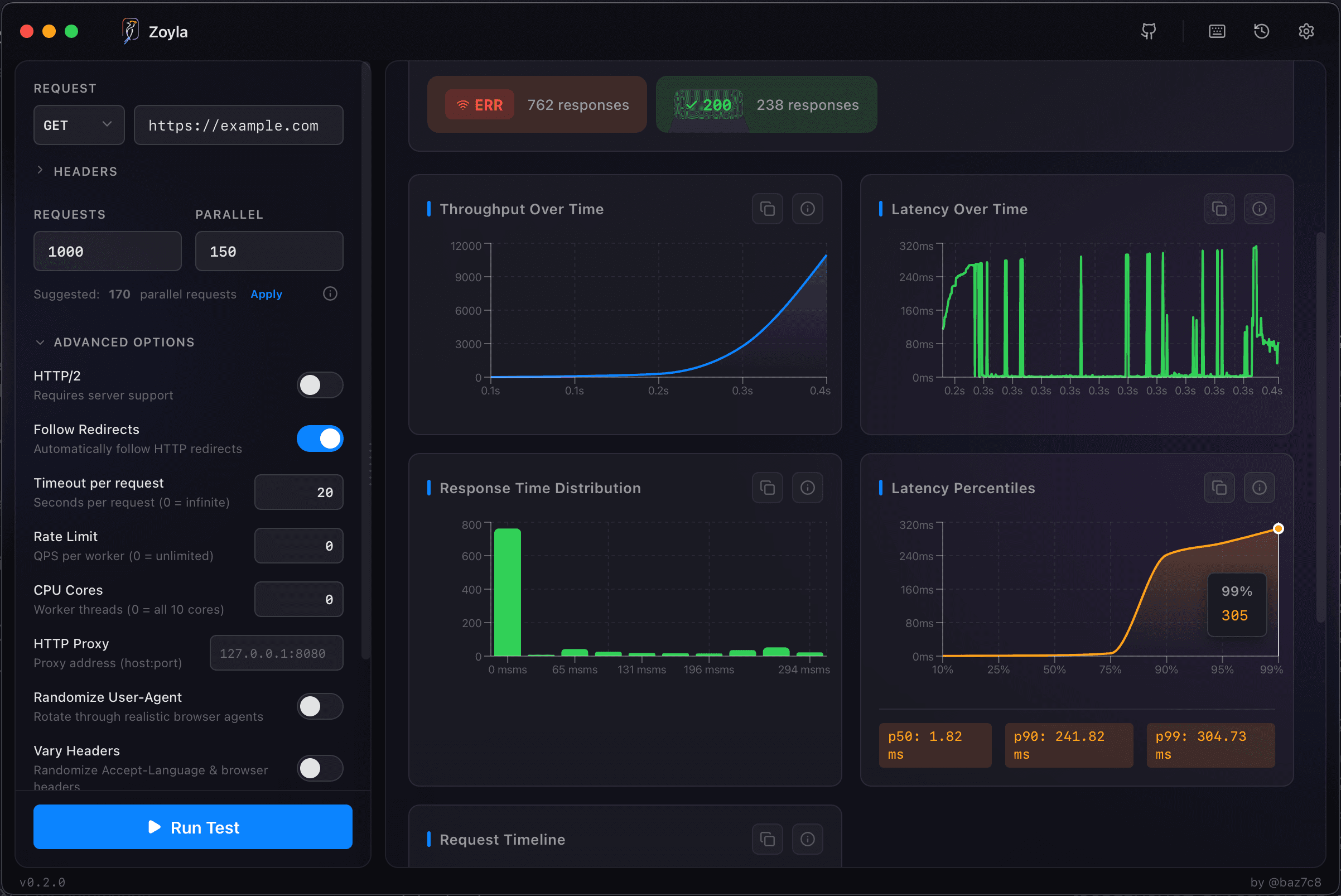
If your app server CPU is maxed, the bottleneck is computation. If the database server is struggling, it's queries. If everything looks fine but responses are slow, you might be waiting on external calls or network. The monitoring during load tests guide covers what to watch.
The pattern matters too. If response times are consistent, the problem is in the critical path. If they spike occasionally, something intermittent is happening — garbage collection, lock contention, cold cache misses.
Quick wins
Add indexes. Seriously. If you haven't analyzed your slow queries and added appropriate indexes, do that first. It's often the biggest single improvement you can make.
Enable connection pooling if you haven't. Creating new database connections is expensive. Reusing them is cheap.
Cache aggressively. If you're computing the same thing repeatedly, cache it. If you're fetching the same data repeatedly, cache it. Redis is your friend. The caching impact testing guide shows how to measure the actual benefit.
Parallelize where possible. If you need data from three sources, fetch from all three simultaneously instead of sequentially.
Slower wins
Sometimes quick fixes aren't enough. You might need to restructure queries, denormalize data, or add read replicas. These take more effort but can yield dramatic improvements.
Profiling your application code can reveal surprises. That utility function you never thought about might be taking 30% of your request time. You won't know until you measure.
And sometimes the answer is more hardware. Not glamorous, but effective. If you've optimized everything you can and still need more capacity, scaling up or out is a valid solution.
The iterative process
Optimization is iterative. You find the worst bottleneck, fix it, and then something else becomes the worst bottleneck. That's normal. Each fix shifts the constraint somewhere else.
Run your load test, identify the problem, make a change, run the test again. Compare the results. Did it help? By how much? The guide on interpreting results explains what to look for.
Keep going until you hit your targets or run out of easy improvements. Then decide if the remaining gains are worth the effort.
Setting realistic targets
What's "fast enough" depends on your use case. For user-facing APIs, aim for p95 under 200ms. Users notice delays above that threshold. For internal services, you might tolerate higher latencies — or need lower ones if they're on a critical path.
Don't chase perfection. Going from 200ms to 100ms is nice. Going from 100ms to 50ms is diminishing returns for most applications. Spend your optimization effort where it matters.
The goal isn't the fastest possible response time. It's response times that meet your users' needs without burning engineering time on micro-optimizations.
Want to measure your API response times? Download Zoyla and see exactly where your time is going.