
Load Testing Microservices Without Losing Your Mind
How to approach load testing when your system is split across dozens of services, and what to watch for that's different from monoliths.
Microservices make some things easier and other things much harder. Load testing falls firmly in the "harder" category.
With a monolith, you hit one endpoint and you're testing the whole thing. With microservices, that one endpoint might call five other services, each with their own databases, each with their own failure modes. The complexity multiplies fast.
The cascade problem
Here's what happens. You load test your API gateway. It looks fine — handles 1000 requests per second, response times are good. You deploy to production. Traffic spikes. Everything falls over.
What went wrong? Your gateway was fine, but one of the downstream services wasn't. And when that service slowed down, requests backed up. The gateway kept accepting new requests while waiting for slow responses. Connection pools filled up. Timeouts cascaded. Suddenly your whole system is on fire because one service couldn't keep up.
This is the cascade problem. In microservices, a slow service is often worse than a dead service. Dead services fail fast. Slow services tie up resources.
What to actually test
You need to test at multiple levels. The individual services, yes. But also the interactions between them.
Start with your entry points — the services that receive external traffic. These are your API gateways, your public endpoints. Test them the way you'd test any API. The API load testing basics apply here.
But don't stop there. Identify your critical paths. When a user logs in, which services are involved? When they make a purchase? Map out these flows and test them end-to-end.
The dependency question
Your services have dependencies. Service A calls Service B calls Service C. When you load test A, you're implicitly testing B and C too. Sometimes that's what you want. Sometimes it isn't.
If you want to test A in isolation, you need to mock or stub its dependencies. This tells you how A performs when everything downstream is fast. Useful for finding A's own bottlenecks.
If you want to test the real system, you test with real dependencies. This tells you how the whole chain performs. Useful for finding integration issues and cascade failures.
Both approaches have value. Neither tells the whole story alone.
Watching the right things
When you run a load test against microservices, you need visibility into all the services in the path. Response time at the edge doesn't tell you which service is slow.
Distributed tracing helps enormously here. Tools like Jaeger or Zipkin show you where time is spent across service boundaries. Without this, you're debugging blind.
At minimum, watch CPU, memory, and error rates for every service in your critical path. When response times spike, you want to know immediately which service is struggling. The monitoring during load tests guide covers what to watch.
The error rates under load guide covers what error patterns to look for.
Timeouts and circuit breakers
In microservices, you need timeouts everywhere. If Service B is slow, Service A shouldn't wait forever. Set reasonable timeouts and test that they work.
Circuit breakers take this further. When a downstream service is failing, stop calling it. Return a degraded response instead of waiting for timeouts. This prevents cascade failures. The timeout configuration testing guide covers setting these correctly.
Load testing is how you verify these patterns work. Push your system until something breaks, then check: did the circuit breaker trip? Did the system degrade gracefully? Or did everything fall over together?
The database multiplier
Each microservice typically has its own database. That's good for isolation but it means you have multiple potential database bottlenecks instead of one.
A service might look fine in isolation but struggle when its database is under load from other services sharing infrastructure. Or connection pools might be sized for normal traffic but insufficient for load test levels.
Check each service's database metrics during load tests. The bottleneck is often hiding in a service you weren't focused on. The connection pooling performance guide covers database connection issues that often appear in microservices.
Realistic traffic patterns
Real traffic to microservices isn't uniform. Some endpoints get hammered, others barely touched. Some services see bursty traffic, others steady streams.
Your load tests should reflect this. If you test every endpoint equally, you'll miss the bottlenecks that only appear under realistic distribution. The realistic load patterns guide has more on this.
Start simple, add complexity
Don't try to test everything at once. Start with your most critical endpoint. Understand its behavior under load. Then expand to include more of the system.
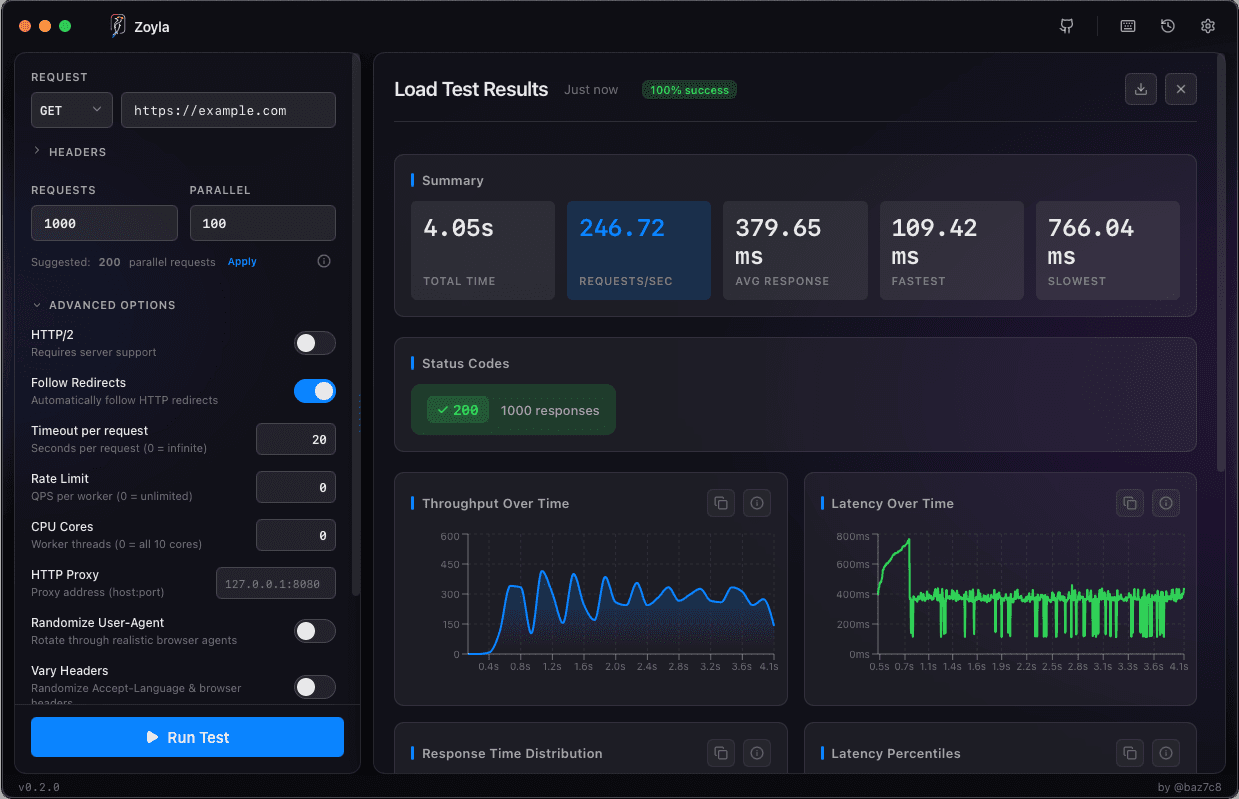
Zoyla makes this iterative approach easy. Run a quick test, see the results, adjust, repeat. You don't need elaborate test infrastructure to get useful data.
The goal isn't to simulate every possible scenario. It's to find the problems that will bite you in production. Usually those are in the obvious places — the critical paths, the high-traffic endpoints, the services everyone depends on.
Test those first. Find the weak links. Fix them. Then worry about the edge cases.
Ready to test your microservices? Download Zoyla and start with your most critical endpoint.