
Catching Performance Regressions Before They Ship
How to detect performance regressions early — establishing baselines, automating checks, and making performance part of your development process.
Performance problems are easier to fix when they're fresh. A regression introduced yesterday is simple to debug — you know what changed. A regression introduced six months ago, buried under hundreds of commits? Good luck finding that.
The trick is catching regressions early. Before they ship. Ideally, before they even merge.
What's a performance regression
A regression is when something that used to work well starts working worse. For performance, that means response times increasing, throughput decreasing, error rates climbing, resource usage growing.
Regressions are sneaky. Each individual change might be tiny. A few extra milliseconds here, a bit more memory there. Nothing alarming on its own. But they accumulate. Six months of tiny regressions and suddenly your API is twice as slow as it was.
Regular testing catches this drift before it becomes a crisis.
Establishing baselines
You can't detect regressions without knowing what "normal" looks like. That's your baseline.
Run load tests against your current production code. Document the results. Response time percentiles, throughput, error rates, resource usage. This is your reference point.
The performance baselines guide covers this in detail. The key is being specific. "Response time is good" isn't a baseline. "P95 response time is 150ms at 100 concurrent users" is a baseline.
Store these numbers somewhere accessible. You'll be comparing against them frequently.
When to test
Test before merging significant changes. Not every commit needs a load test, but changes that touch performance-sensitive code should be verified. The when to load test guide helps you decide which changes warrant testing.
Test after deployments. Compare production performance to your baseline. If there's a regression, you know it happened in that deployment.
Test periodically even without changes. Performance can degrade due to data growth, dependency updates, infrastructure changes. Weekly or monthly baseline checks catch these.
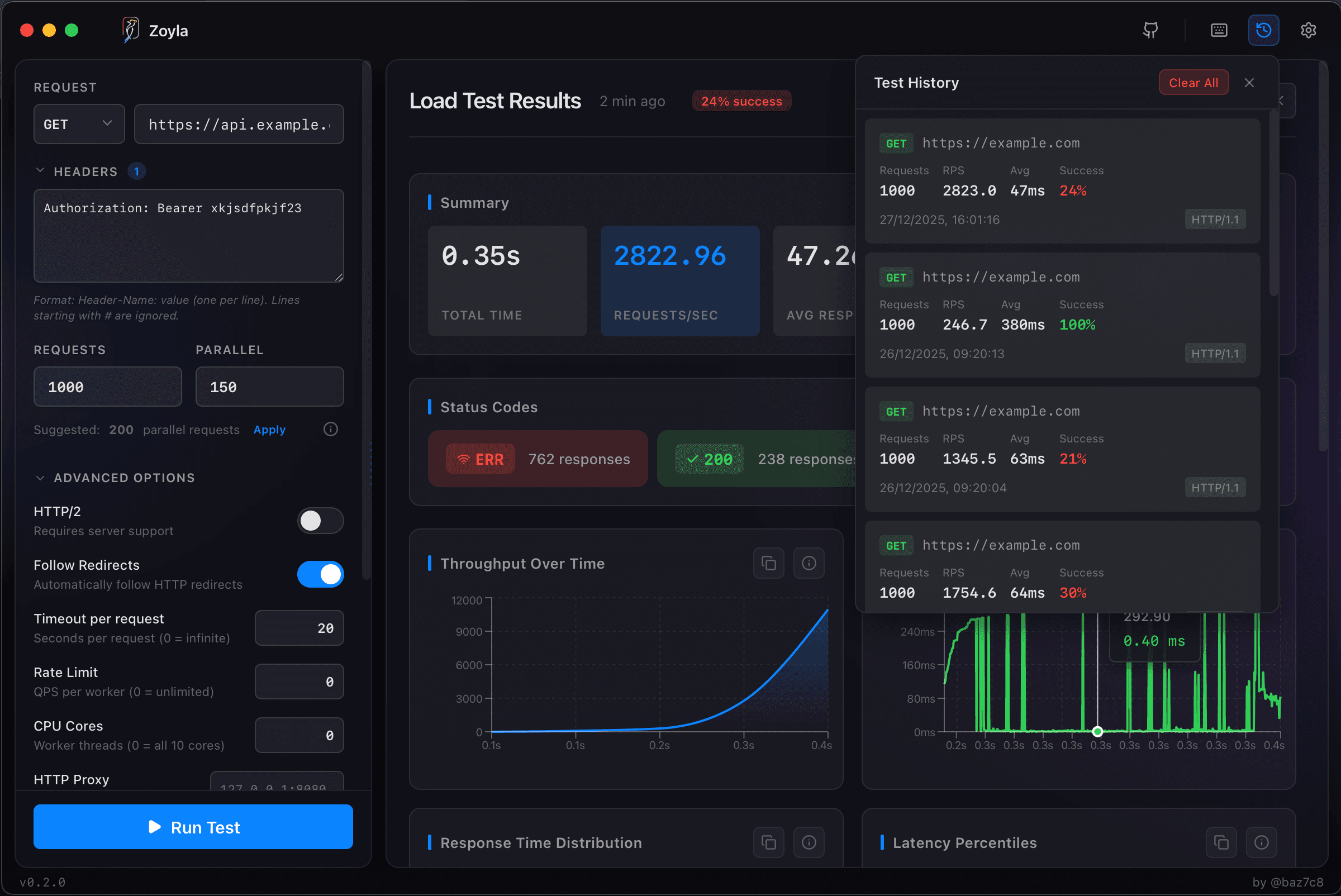
Zoyla's test history makes comparison easy. Run the same test configuration repeatedly and see how results change over time.
Automated vs manual
Manual testing works but doesn't scale. Someone has to remember to run tests, interpret results, raise alarms. That's fine for occasional checks but not for catching every regression.
Automated testing catches more. Run load tests in CI/CD. Compare results to baselines automatically. Fail the build or alert when thresholds are exceeded.
The continuous performance testing guide covers automation approaches. Even simple automation — a script that runs a load test and checks if P95 exceeds a threshold — catches regressions that manual testing would miss.
What to compare
Don't just compare averages. Compare the full distribution.
A change that improves average response time but worsens P99 is a regression for your slowest users. A change that maintains throughput but increases CPU usage is a regression in efficiency.
Compare:
- Response time percentiles (P50, P95, P99)
- Throughput at standard load
- Error rates
- Resource usage (CPU, memory)
If any of these get significantly worse, investigate before shipping.
Defining "significant"
Not every variation is a regression. Systems have natural variance. A P95 of 152ms versus 148ms is probably noise, not a regression.
Set thresholds that account for variance. Maybe a 10% increase in response time is acceptable variation. A 20% increase triggers investigation. A 50% increase blocks the release.
These thresholds depend on your application. Latency-sensitive systems need tighter thresholds. Background processing systems can tolerate more variance.
Start conservative and adjust based on experience. If you're getting false positives constantly, loosen thresholds. If regressions are slipping through, tighten them.
The investigation process
When you detect a regression, you need to find the cause.
If you're testing before merge, the cause is probably in the changes being merged. Review the diff. Look for database queries, algorithm changes, new dependencies.
If you're testing after deployment, compare to the previous deployment. What changed? Code changes, configuration changes, dependency updates — any of these could be responsible.
If you're testing periodically and find regression, it's harder. You need to narrow down when it started. Binary search through recent deployments if necessary.
The interpreting load test results guide helps with analysis once you've identified a regression.
Common regression sources
New database queries. Someone added a query that's fine in development but slow in production with real data volumes.
Missing indexes. A new feature queries data in a new way. The index for that query pattern doesn't exist.
Increased payload sizes. Responses got bigger. Serialization takes longer. Network transfer takes longer.
Dependency updates. A library update changed performance characteristics. Sometimes for the better, sometimes not.
Logging or monitoring additions. Debug logging that was supposed to be temporary. Metrics collection that's more expensive than expected.
Algorithm changes. The new approach is cleaner but slower. Or it's faster for small inputs but slower for large ones.
Making it cultural
Catching regressions isn't just about tools. It's about making performance part of how your team thinks about changes.
Review performance implications during code review. Ask "how does this affect response time?" the same way you ask "how does this affect correctness?"
Celebrate catching regressions early. The developer who finds a problem before merge saved the team from a production incident.
Share performance results. When load tests run, make the results visible. Trends over time tell a story about your system's health. The testing before launch guide covers pre-release testing specifically.
Start simple
You don't need elaborate infrastructure to catch regressions. Start with:
- A documented baseline
- A repeatable load test
- A threshold for acceptable variance
- Someone checking results before releases
That's enough to catch most regressions. Add automation as you scale.
The goal isn't perfect detection of every regression. It's catching the significant ones before they reach users. A simple process that runs consistently beats a sophisticated process that nobody uses. The simple load testing setup guide shows how to get started with minimal friction.
Want to track your performance over time? Download Zoyla and start building your baseline today.